

ASN DPI
Deep Packet Inspection (DPI) is a powerful technique that analyzes network traffic at the packet level, going beyond basic header inspection to examine the payload—the actual data being transmitted.
Application, Protocol, and Category Identification with DPI
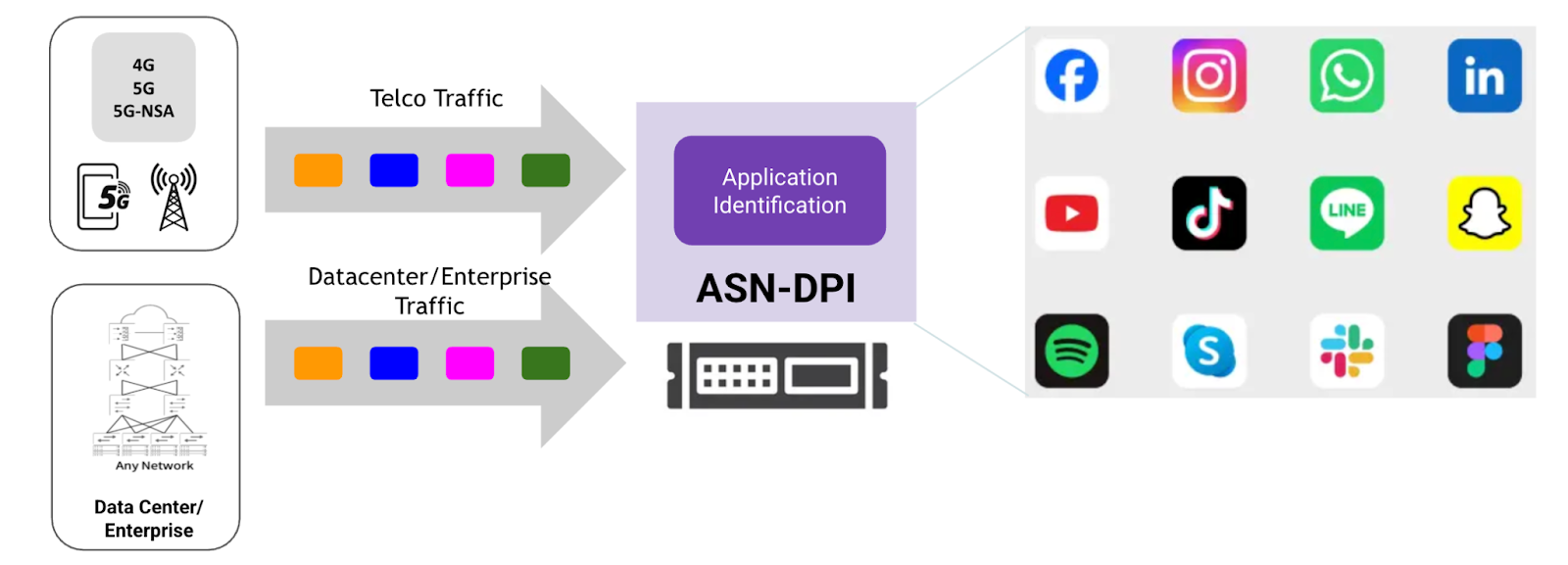
ASN Deep Packet Inspection enables precise identification of 2,700+ applications and 9,000+ subcategory applications, and their attributes by analyzing network traffic in detail. This capability allows organizations to know exactly which apps are running—whether it’s video, audio, gaming, file transfer, or chat—along with the underlying protocols they use. Categorizing traffic helps in applying tailored policies for security, bandwidth allocation, and compliance. By understanding both the app and its category, enterprises and telcos can optimize network performance, enforce acceptable use policies, and gain valuable insights into user behavior and traffic trends
DPI Benefits for Telcos
For telecom operators, ASN DPI delivers detailed application, protocol, and category identification—covering over 2,700+ apps—combined with critical session KPIs such as average, max, and min bandwidth, uplink/downlink latency, and packet retransmissions. This data helps telcos monitor how many users are engaging with each app and how network resources are being consumed in real time. By correlating user behavior with network performance metrics, telcos can optimize bandwidth allocation, improve quality of service for high-priority applications, and quickly troubleshoot performance issues. Additionally, rich metadata like HTTP hostnames and user-agent information aids in refining subscriber analytics, enabling personalized service offerings and efficient network management.
DPI Benefits for Data Centers/Enterprise
In data centers and enterprise networks, ASN DPI combines accurate app, protocol, and category identification with detailed session metrics—such as bandwidth usage, latency, and packet loss—to provide deep visibility into application performance and user experience. Tracking how many users access specific applications and the bandwidth consumed per session allows IT teams to optimize resource allocation and enforce security policies effectively. Latency and retransmission data help identify network bottlenecks or faulty links, enabling proactive issue resolution. Supplemented by metadata like HTTP URLs and user agents, this granular insight empowers enterprises to manage complex traffic flows, ensure compliance, and enhance overall network reliability and efficiency.
DPI Dynamic Upgrade: Always Stay Current:
In a fast-changing digital landscape where new applications and protocols constantly emerge, a static DPI quickly becomes outdated. ASN-DPI addresses this challenge with a robust DPI dynamic upgrade mechanism, allowing its detection engine and protocol signature database to be updated on the fly—without service interruption or the need for full software redeployment.
DPI Metadata Payload Supported Headers:
Complete List of Applications
HTTP_HostName
Hostname from the Host: header, indicating which virtual host the client is accessing (e.g., api.example.com).
HTTP_url
The request path and query portion of the HTTP request line (e.g., /login).
HTTP_UserAgent
Client’s user agent string identifying browser, OS, and device.
HTTP_DetectedOS
OS extracted from the User-Agent string (e.g., “Windows NT 10.0”).
HTTP_Method
HTTP request method such as GET, POST, PUT, DELETE.
HTTP_Referer
URL of the page that referred the client to the current request.
HTTP_ClientContType
Content-Type header sent by the client, describing the format of the request body.
HTTP_ClientContLength
Content-Length header from the client, indicating size of the request body in bytes.
HTTP_Accept
MIME types the client is willing to accept in the response.
HTTP_Origin
Origin header for CORS requests, specifying the origin of the client website.
HTTP_ClientConnection
Connection header from the client indicating connection behavior (e.g., keep-alive).
HTTP_X_Forwarded_For
Client’s original IP address when passing through proxies or load balancers.
HTTP_X_Session_Type
Custom extension header indicating session type (e.g., “user”).
HTTP_X_Stream_Type
Custom header specifying type of stream (e.g., “live”).
HTTP_X_Online_Host
Custom header providing upstream host information (e.g., proxy or CDN host).
HTTP_X_Requested_With
Header typically used for AJAX requests (e.g., XMLHttpRequest).
HTTP_ServerContType
Content-Type header sent by the server describing the response body format.
HTTP_ServerContLength
Content-Length header from the server, indicating response body size (bytes).
HTTP_ResponseCode
HTTP status code returned by the server (e.g., 200, 404, 500).
HTTP_ServerContEncoding
Content-Encoding header specifying compression (e.g., gzip, deflate).
HTTP_TransferEncoding
Transfer-Encoding header (e.g., chunked); NULL if not present.
HTTP_Server
Server header identifying the server software and version.
HTTP_ServerConnection
Server’s Connection header indicating connection handling (e.g., keep-alive).
DNS_DomainName
Fully qualified domain name from the DNS query,
DNS_QueryType
DNS record type requested by the client (e.g., A, AAAA).
DNS_QueryClassType
DNS class of the query, normally IN (Internet).
DNS_RespType
Record type returned in the DNS answer section (e.g., A, AAAA).
DNS_RespClassType
Class of the returned DNS answer (IN or NULL if no answer).
DNS_RespCode
DNS response code indicating the server’s status (e.g., NoError, NXDOMAIN, NonExistentDomain).
DNS_IPv4
IPv4 address returned in the DNS answer for A records, or NULL if not present.
DNS_IPv6
IPv6 address returned for AAAA records, or NULL if not present.
DNS_Answer_TTL
Time-to-live value from the DNS answer record, indicating how long the response is valid
HTTP2_Authority
Value of the HTTP/2 :authority pseudo-header, typically containing the host and optional port (e.g., example.com).
HTTP2_Path
The HTTP/2 :path pseudo-header indicating the request URI path (e.g., /test).
HTTP2_Method
HTTP/2 :method pseudo-header specifying the request method such as GET, POST, PUT, etc.
HTTP2_Status
HTTP/2 :status pseudo-header representing the response status code returned by the server (e.g., 200).
HTTP2_UserAgent
Contents of the user-agent header sent by the client, identifying browser, app, device, or client software.
HTTP2_Referer
Value of the referer header showing the page or source that initiated the request.
HTTP2_Host
host header value, often redundant with :authority, used for backward compatibility.
HTTP2_Server
Server header identifying the HTTP/2 server software and version.
HTTP2_X_Requested_With
Custom application header, commonly indicates AJAX or app-initiated requests (e.g., XMLHttpRequest or app package name).
HTTP2_X_Android_Package
Custom header identifying the Android application package that generated the request.
HTTP2_X_App_Key
Custom header containing application-specific API key or authentication token.
HTTP2_Location
location header from the server’s response, typically used for redirects pointing to the next URL.
DHCP_YourIPAddr
The IPv4 address assigned to the client by the DHCP server (the yiaddr field in the DHCP OFFER/ACK message).
DHCP_ClientMacAddr
The MAC address of the DHCP client requesting the IP address, taken from the DHCP chaddr field.
DHCP_LeaseTime
The duration (in seconds) for which the assigned IP address is valid, extracted from the DHCP option “IP Address Lease Time”.
SIP_CALL_ID
Unique identifier of the SIP call (from the Call-ID header). Used to correlate all SIP messages and RTP streams belonging to the same call.
SIP
DIRECTION
Direction of this signaling leg relative to the probe (e.g., UPLINK / DOWNLINK). Typically derived from the interface or IP rules.
ExpType
SIP session classification (e.g., NORMAL, ERROR, RETRY). Indicates how the SIP session was processed.
SIP_SDP_MEDIA_COUNT
Number of m= media lines in the SDP body. Each media line represents one media stream (audio/video).
SDP
SIP_SDP_MEDIA_TYPE_0
Media type of the first m= line, e.g., “audio” or “video”.
SDP
SIP_SDP_MEDIA_PROTOCOL_0
Transport protocol for the media stream from SDP (e.g., RTP/AVP, RTP/SAVP, UDP/TLS/RTP/SAVPF).
SDP
SIP_SDP_MEDIA_CONNECTIONS_0
Connection address and port of the media stream: <IP>:<Port> taken from "m=" or "c=" SDP lines.
SDP
SIP_SDP_MEDIA_NUMBER_OF_FORMATS_0
Number of payload formats listed for this media stream.
SDP
SIP_SDP_MEDIA_FORMAT_0
List of RTP payload types (e.g., 8 13 101) offered or accepted for this media stream.
SDP
SIP_RTP_SessionID
A SIP-derived unique session identifier linking the RTP media stream to its corresponding SIP call
Correlated (SIP ↔ RTP)
RTP_AV_SessionID
Internal media stream identifier used to differentiate individual audio/video flows within the same call.
Correlated
RTP_SenderID
Unique ID representing the endpoint sending the RTP packets, derived from SIP signaling.
Correlated
RTP_ReceiverID
Unique ID representing the endpoint receiving the RTP packets, used to identify the destination leg of the media stream.
Correlated
RTP_EncodingName
Codec name negotiated in SDP (e.g., PCMU, PCMA, OPUS, CN), indicating how payload bytes must be interpreted.
SIP/Correlated
RTP_MediaType
Indicates whether the RTP flow carries audio or video, extracted from SDP (m= line).
SIP/Correlated
RTP_ClockRate
The sample clock rate for the codec (e.g., 8000 for G.711) used for timestamp progression.
SIP/Codec
RTP_Channels
Number of audio channels (mono=1, stereo=2), taken from SDP attribute fields.
SIP
RTP_SeqNo
The packet’s RTP sequence number used for packet ordering, loss detection, and OOO detection.
RTP Packet
RTP_Timestamp
RTP timestamp that indicates the playback position based on the codec’s clock rate.
RTP Packet
RTP_Payload
RTP payload type number identifying the codec or special types like comfort noise (13).
RTP Packet
RTP_PacketInterval
The theoretically expected inter-packet spacing in milliseconds based on codec frame size (e.g., 20ms for G.711).
Correlated/Codec-based
RTP_PacketIntervalMeasured
Actual measured time difference between consecutive RTP packets received, used for jitter detection.
Correlated/Derived
KPI_RTP_PacketLost
Total number of missing sequence numbers indicating RTP packet loss over the flow.
Derived KPI
KPI_RTP_Jitter
RTP jitter value per RFC 3550, reflecting variation in packet arrival times.
Derived KPI
KPI_RTP_JitterMs
Jitter expressed in milliseconds (converted from RTP timestamp units).
Derived KPI
KPI_RTP_Frequency
The RTP clock frequency used for jitter and latency calculations (matches RTP_ClockRate).
Derived/Correlated
KPI_RTP_PacketOverhead
Total overhead bytes per RTP packet including IP/UDP/RTP headers (used for bandwidth analysis).
Derived KPI
KPI_RTP_PacketOoo
Count of packets arriving out-of-order compared to sequence numbers.
Derived KPI
KPI_RTP_PacketDuplicate
Count of duplicate RTP packets with identical sequence numbers.
Derived KPI
SSL_ServerName
The server hostname extracted from the TLS ClientHello SNI (Server Name Indication) extension.
SSL_ClientVersion
TLS version proposed by the client in ClientHello (e.g., TLS 1.2 or TLS 1.3).
SSL_ClientSessionId
Session ID provided in ClientHello for session reuse; NULL if empty or using session tickets.
SSL_SerialNumber
Certificate serial number from the server certificate.
SSL_ValidityStart
Start time of certificate validity (Not Before field).
SSL_ValidityEnd
End time of certificate validity (Not After field).
SSL_Subject_Country
Country (C) from the certificate Subject field.
SSL_Subject_PostalCode
Postal code from the certificate Subject field (if present).
SSL_Subject_State
State/Province (ST) of the certificate Subject.
SSL_Subject_Locality
Locality/City (L) of the certificate Subject.
SSL_Subject_Street
Street address of the certificate Subject (if included).
SSL_Subject_Organization
Organization (O) name from the certificate Subject.
SSL_Subject_OrgUnit
Organizational Unit (OU) from the Subject.
SSL_Subject_CommonName
Common Name (CN) of the certificate Subject, typically the server domain.
SSL_ServerSessionId
Session ID sent by the server in ServerHello (used in TLS <1.3).
SSL_CipherSuite
Cipher suite negotiated between client and server for the session.
SSL_ServerVersion
TLS version selected by the server in ServerHello.
SSL_Compression
TLS compression method (usually “null” since compression is deprecated).
SSL_SKE_CurveType
Elliptic curve type used during Server Key Exchange (e.g., named_curve).
SSL_SKE_NamedCurve
The exact elliptic curve selected by the server (e.g., x25519, secp256r1).
SSL_SKE_PublicKeyLength
Length of the ephemeral public key (in bytes) used in ECDHE key exchange.
SSL_SKE_HashAlgorithm
Hash algorithm used in the ServerKeyExchange signature (e.g., sha384).
SSL_SKE_SignatureAlgorithm
Signature algorithm used for signing the key exchange parameters (e.g., rsa, ecdsa).
SSL_TLS_SignatureScheme
Full TLS signature scheme combining hash + signature (e.g., rsa_pkcs1_sha384).
SSL_SKE_SignatureKeyLength
Size of the server’s signature key in ServerKeyExchange (in bytes).
SSL_CertVersion
X.509 certificate version (v1, v2, v3).
SSL_Issuer_Country
Country name in the certificate Issuer field.
SSL_Issuer_State
State/Province from the certificate Issuer.
SSL_Issuer_Locality
Locality/City from the certificate Issuer.
SSL_Issuer_Organization
Organization name in the Issuer field.
SSL_Issuer_OrgUnit
Organizational Unit from the Issuer.
SSL_Issuer_CommonName
Common Name of the certificate Issuer (typically the CA).
SSL_ClientJA3Fingerprint
JA3 fingerprint of the TLS ClientHello — identifies client software & TLS settings.
SSL_ClientJA4Fingerprint
JA4 fingerprint of the ClientHello — an improved version of JA3 with added normalization.
SSL_ServerJA3Fingerprint
JA3S fingerprint calculated from the ServerHello — identifies server TLS configuration.
QUIC_SNI
Server Name Indication extracted from the QUIC Client Hello (TLS over QUIC) identifying the target domain.
QUIC_UAID
QUIC User Agent ID (Chrome/Google QUIC specific); NULL if not present.
QUIC_STK
Source Token from older Google QUIC versions for address validation; NULL in IETF QUIC.
QUIC_CCS
Client Connection State used in Google QUIC (pre-IETF); NULL for IETF QUIC.
QUIC_SCID
Source Connection ID (client-generated), if present.
QUIC_CID
Generic Connection ID field where PACE2 stores legacy or ambiguous CID values.
QUIC_DCID
Destination Connection ID used by the server to route packets (client → server).
QUIC_VERSION
QUIC version advertised by the client in the Initial packet.
QUIC_TP_MaxIdleTimeout
Maximum idle timeout (in ms) allowed before the connection can be silently closed.
QUIC_TP_MaxUdpPayloadSize
Maximum size (bytes) of a UDP datagram the endpoint is willing to receive.
QUIC_TP_InitialMaxData
Maximum connection-wide data the peer may send before requiring flow control updates.
QUIC_TP_InitialMaxStreamDataBidiLocal
Max data on bidirectional streams initiated by the local endpoint.
QUIC_TP_InitialMaxStreamDataBidiRemote
Max data on bidirectional streams initiated by the remote endpoint.
QUIC_TP_InitialMaxStreamDataUni
Max data allowed on unidirectional streams.
QUIC_TP_InitialMaxStreamsBidi
Max number of bidirectional streams the peer may open.
QUIC_TP_InitialMaxStreamsUni
Max number of unidirectional streams the peer may open.
QUIC_TP_AckDelayExponent
Exponent used in ACK delay encoding; defines granularity of ACK timestamps.
QUIC_TP_MaxAckDelay
Maximum expected delay (in ms) before an ACK frame is sent.
QUIC_TP_ActiveConnectionIdLimit
Maximum number of simultaneous active connection IDs the peer supports.
QUIC_TP_InitialSCID
Initial Source CID from transport parameters; NULL if not included.
QUIC_TP_MaxDatagramFrameSize
Maximum DATAGRAM frame size the peer supports (for unreliable QUIC datagrams).
QUIC_TP_ChosenVersion
QUIC version ultimately negotiated and selected for the session.
QUIC_TP_AvailableVersion
Version the endpoint says it supports (from Version Information).
QUIC_TP_FurtherVersions
Additional QUIC versions the endpoint supports (from Version Information).
QUIC_TP_GreaseBit
GREASE (Generate Random Extensions And Sustain Extensibility) bit usage status (“Enabled/Disabled”).
QUIC_TP_DisableActiveMigration
Indicates if client/server disallows connection migration (“Yes/No”).
QUIC_DetectedOS
Operating system
QUIC_ClientJA3Fingerprint
JA3 fingerprint computed from QUIC ClientHello TLS parameters.
QUIC_ClientJA4Fingerprint
JA4 fingerprint for QUIC — modern normalized TLS fingerprint identifying client behavior.
NETBIOS_Query_0_Name
The NetBIOS name being queried by the client, including the 16th-byte suffix (e.g., <00> for Workstation Service).
NETBIOS_Query_0_Type
DNS-style query type for NBNS; “NB” means NetBIOS Name Service (Resource Record type 0x0020).
NETBIOS_Query_0_Class
Query class; almost always IN (Internet).
NETBIOS_ANS_0_Name
The NetBIOS name returned in the NBNS answer section (must match the query name).
NETBIOS_ANS_0_Type
NBNS answer record type; “NB” indicates a NetBIOS address record.
NETBIOS_ANS_0_Class
Answer record class; normally IN.
NETBIOS_ANS_0_NB_FLAGS
NetBIOS flags from the resource record, defining name type (unique/group) and node type.
NETBIOS_ANS_0_IP
The IPv4 address associated with the NetBIOS name returned in the NBNS answer.
NETBIOS_ANS_0_TTL
Time-to-live for the NetBIOS name association, in seconds (e.g., 259200 = 3 days).
NETBIOS_ANS_0_RDataHex
Raw RDATA bytes of the NBNS answer in hexadecimal, containing NB_FLAGS + IPv4 address.
APN
Application Generic
Correlation Status
COUNTRY
COUNTRY_CODE
DNS Domain Name
DNS IPv4 Addr
DNS IPv6 Addr
DNS_QueryClassType
DNS Query Type
DNS Resp Type
DNS_RespClassType
DNS_RespCode
DNS_Answer_TTL
Hash-Core Index
HTTP content_type
HTTP detected_os
HTTP Host Name
HTTP response code
HTTP url
HTTP user_agent
IMEI
IMSI
Inner Dst IP
Inner Dst Port
Inner Protocol
Inner Src IP
Inner Src Port
IP Protocol Generic
KPI_INTERVAL_AVG_BW
KPI_INTERVAL_AVG_UPLANE_DOWNLINK_LATENCY
KPI_INTERVAL_AVG_UPLANE_UPLINK_LATENCY
KPI_PACKET_LOSS_COUNT
KPI_RETRANSMIT_COUNT
KPI_UPLANE_MAX_AVG_BW
KPI_UPLANE_MAX_DOWNLINK_LATENCY
KPI_UPLANE_MAX_UPLINK_LATENCY
KPI_UPLANE_MIN_AVG_BW
KPI_UPLANE_MIN_DOWNLINK_LATENCY
KPI_UPLANE_MIN_UPLINK_LATENCY
MCC
MNC
MOBILE NETWORK
Outer Dst IP
Outer Dst Port
Outer Protocol
Outer Src IP
Outer Src Port
Payload type
RAT_TYPE
Server Name
TEID
Total Bytes
Total Packets
Traffic Direction
UE_IPv4_ADDR
UE_IPv6_ADDR
UE_IPv6_Prefix
USER_TYPE
Published_Time
Session_Created_Time
Session_Last_Seen_Time
HTTP_HostName
HTTP_url
HTTP_UserAgent
HTTP_DetectedOS
HTTP_Method
HTTP_Referer
HTTP_ClientContType
HTTP_ClientContLength
HTTP_Accept
HTTP_Origin
HTTP_ClientConnection
HTTP_X_Forwarded_For
HTTP_X_Session_Type
HTTP_X_Stream_Type
HTTP_X_Online_Host
HTTP_X_Requested_With
HTTP_ServerContType
HTTP_ServerContLength
HTTP_ResponseCode
HTTP_ServerContEncoding
HTTP_TransferEncoding
HTTP_Server
HTTP_ServerConnection
DNS_DomainName
DNS_QueryType
DNS_QueryClassType
DNS_RespType
DNS_RespClassType
DNS_RespCode
DNS_IPv4
DNS_IPv6
DNS_Answer_TTL
HTTP2_Authority
HTTP2_Path
HTTP2_Method
HTTP2_Status
HTTP2_UserAgent
HTTP2_Referer
HTTP2_Host
HTTP2_Server
HTTP2_X_Requested_With
HTTP2_X_Android_Package
HTTP2_X_App_Key
HTTP2_Location
DHCP_YourIPAddr
DHCP_ClientMacAddr
DHCP_LeaseTime
SIP_RTP_SessionID
RTP_AV_SessionID
RTP_SenderID
RTP_ReceiverID
RTP_EncodingName
RTP_MediaType
RTP_ClockRate
RTP_Channels
RTP_SeqNo
RTP_Timestamp
RTP_Payload
RTP_PacketInterval
RTP_PacketIntervalMeasured
KPI_RTP_PacketLost
KPI_RTP_Jitter
KPI_RTP_JitterMs
KPI_RTP_Frequency
KPI_RTP_PacketOverhead
KPI_RTP_PacketOoo
KPI_RTP_PacketDuplicate
SSL_ServerName
SSL_ClientVersion
SSL_ClientSessionId
SSL_SerialNumber
SSL_ValidityStart
SSL_ValidityEnd
SSL_Subject_Country
SSL_Subject_PostalCode
SSL_Subject_State
SSL_Subject_Locality
SSL_Subject_Street
SSL_Subject_Organization
SSL_Subject_OrgUnit
SSL_Subject_CommonName
SSL_ServerSessionId
SSL_CipherSuite
SSL_ServerVersion
SSL_Compression
SSL_SKE_CurveType
SSL_SKE_NamedCurve
SSL_SKE_PublicKeyLength
SSL_SKE_HashAlgorithm
SSL_SKE_SignatureAlgorithm
SSL_TLS_SignatureScheme
SSL_SKE_SignatureKeyLength
SSL_CertVersion
SSL_Issuer_Country
SSL_Issuer_State
SSL_Issuer_Locality
SSL_Issuer_Organization
SSL_Issuer_OrgUnit
SSL_Issuer_CommonName
SSL_ClientJA3Fingerprint
SSL_ClientJA4Fingerprint
SSL_ServerJA3Fingerprint
QUIC_SNI
QUIC_UAID
QUIC_STK
QUIC_CCS
QUIC_SCID
QUIC_CID
QUIC_DCID
QUIC_VERSION
QUIC_TP_MaxIdleTimeout
QUIC_TP_MaxUdpPayloadSize
QUIC_TP_InitialMaxData
QUIC_TP_InitialMaxStreamDataBidiLocal
QUIC_TP_InitialMaxStreamDataBidiRemote
QUIC_TP_InitialMaxStreamDataUni
QUIC_TP_InitialMaxStreamsBidi
QUIC_TP_InitialMaxStreamsUni
QUIC_TP_AckDelayExponent
QUIC_TP_MaxAckDelay
QUIC_TP_ActiveConnectionIdLimit
QUIC_TP_InitialSCID
QUIC_TP_MaxDatagramFrameSize
QUIC_TP_ChosenVersion
QUIC_TP_AvailableVersion
QUIC_TP_FurtherVersions
QUIC_TP_GreaseBit
QUIC_TP_DisableActiveMigration
QUIC_DetectedOS
QUIC_ClientJA3Fingerprint
QUIC_ClientJA4Fingerprint
NETBIOS_Query_0_Name
NETBIOS_Query_0_Type
NETBIOS_Query_0_Class
NETBIOS_ANS_0_Name
NETBIOS_ANS_0_Type
NETBIOS_ANS_0_Class
NETBIOS_ANS_0_NB_FLAGS
NETBIOS_ANS_0_IP
NETBIOS_ANS_0_TTL
NETBIOS_ANS_0_RDataHex
Download List of Applications with Content Type and Protocol
Last updated