

Fabric
🌐 Fabric
The Fabric empowers users to easily orchestrate Spectrum-X deployments with support for both 1SU and 2SU topologies, delivering flexibility for different scale requirements.
With ONES, users can effortlessly design complete GPU networks powered by Spectrum-X 🌐. By providing just a few simple inputs ⌨️, ONES recommends the optimal switches (spine & leaf) and servers ⚙️. Users can then deploy these seamlessly, while ONES takes care of end-to-end orchestration 🚀 — ensuring a streamlined, reliable, and automated GPU fabric design.
🚀 Key Capabilities:
Intuitive Orchestration – Simplifies complex network setups with a guided, user-friendly workflow.
Multi-Tenancy Support – Enables multiple organizations or business units to share infrastructure securely, with clear isolation of resources.
Scalable Design – Built to grow with your infrastructure, ensuring seamless expansion without added complexity.
Consistency & Reliability – Automatically validates configurations to reduce errors and improve deployment confidence.
Faster Time-to-Value – Cuts down deployment cycles, allowing enterprises to get Spectrum-X running in minutes instead of days.
With Fabric, administrators can achieve a future-ready, multi-tenant network fabric that is both scalable and efficient, while maintaining the highest standards of performance and reliability.

🌐 Fabric Orchestration
Navigate: Manage >> Fabric >> New Design
Add the details and Continue

Add the inputs:
Scalable Unit Config
Apply Hosts (number of host per SUs)
Subnet to be used for GPU NICs
User will have option to configure E-W and N-S Network configuration


As per the inputs, Fabric populate the topology structure

Topology details will be visible

Validation
import the inventory with all the devices details and validate the switch and server inventory

User can select the Border Leaf Ports


Deploy the Fabric

In Few minutes Deployment will be done

🌐 Brownfield Support
ONES Fabric goes beyond greenfield deployments by offering comprehensive brownfield support 🏗️. With its powerful integration capabilities, ONES seamlessly connects to your existing infrastructure 🔌, enabling you to bring legacy environments into the modern fabric architecture.
Not only does it integrate smoothly with your current setup, but it also empowers you to perform Day-2 operations with ease ⚙️—ensuring continuous optimization, scalability, and operational efficiency 🚀 without disrupting existing services.

With ONES, your brownfield environment becomes a part of a future-ready, intelligent, and fully orchestrated fabric 🌟.
🌐 NVIDIA AIR Deployment
💡 Flexibility with NVIDIA AIR NVIDIA AIR 🌐, the digital twin for Spectrum-X 🖥️, empowers users to design, model, and validate complex topologies 🧩 in a virtual, scalable, and easy-to-use environment. By testing and refining your desired fabric architecture before deploying it in production ⚡, AIR ensures smoother, more reliable, and seamless fabric orchestration 🚀.
Navigate: Manage >> Fabric >> New Design
Add the details and Continue

Add the inputs:
Scalable Unit Config
Apply Hosts (number of host per SUs)
Subnet to be used for GPU NICs
User will have option to configure E-W and N-S Network configuration
As per the inputs, Fabric auto populate the topology structure
Topology details will be visible, then proceed to next
Click Launch in NVIDIA AIR

Add the required details and Sign In

Once Sign in it will launch NVIDIA AIR
Select the Simulation

It will show the Topology
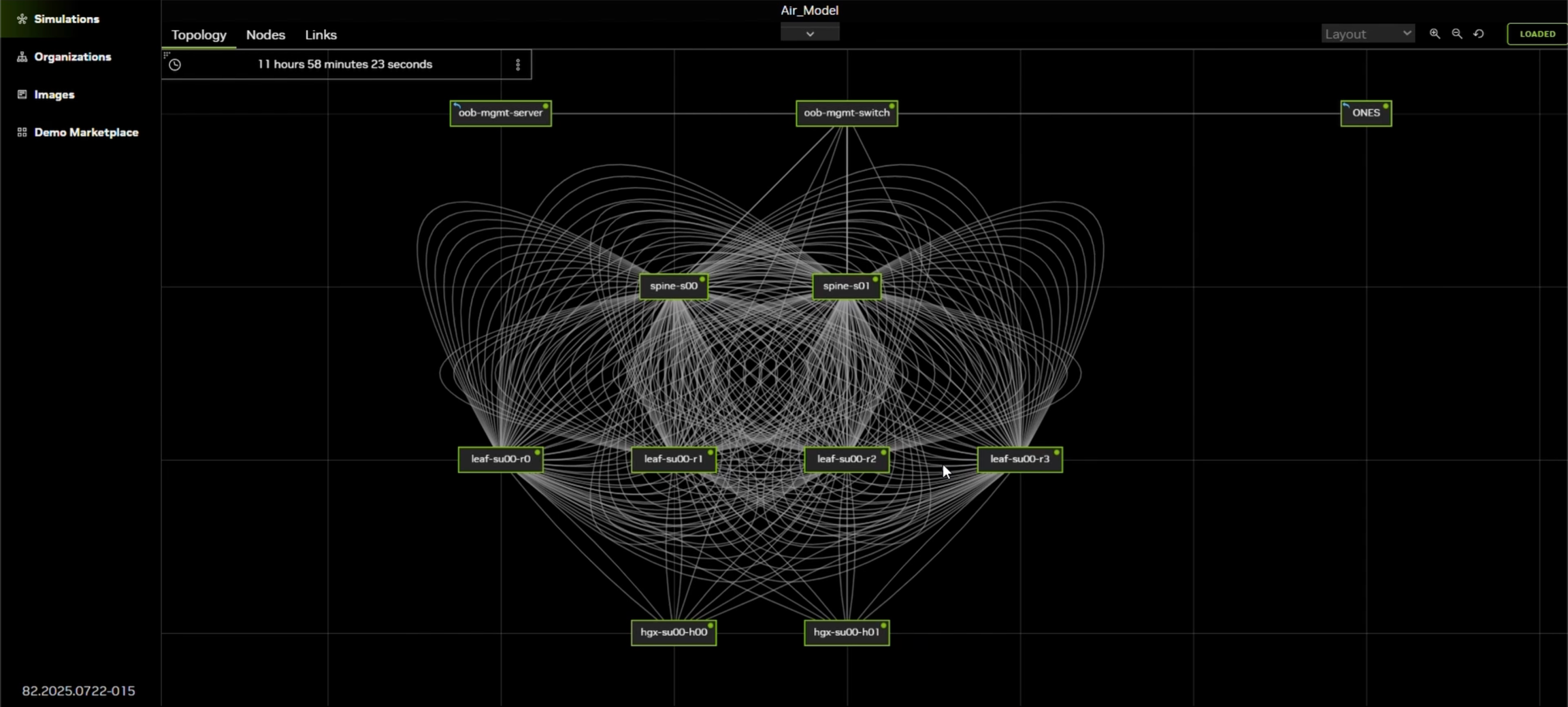
User can come back to Model page to check the status

ONES will orchestrate the Fabric and will pass the operational and config status

Tenant Configuration
🌐 Fabric
The Fabric page allows users to view and manage multitenancy fabric deployments created using ONES.
🔎 Key Features:
Fabric Visibility – Provides a complete overview of all deployed fabrics in the system.
Multi-Tenancy Insights – Displays details of each tenant’s fabric setup, ensuring clear separation and easy management.
Deployment Details – Shows fabric topology, configuration status, and associated resources in one centralized view.
Audit & Tracking – Maintains historical data of deployed fabrics for better monitoring and compliance.
Simplified Navigation – Enables administrators to quickly switch between different fabrics and tenants.
With this page, admins can ensure full transparency and control over their multi-tenant Spectrum-X fabrics, improving operational efficiency and reducing complexity.

Add Tenant
Once the fabric is successfully deployed, users have the option to add tenants for network segmentation and multi-tenancy support.
Select the Fabric where user needs to add tenant

Add a new Tenant

Add the details and continue

Once applied, Add all GPUs and apply the Tenant config

Finally process will start and tenant will be added
✨ With this approach, multiple tenants can be managed seamlessly within the same fabric while maintaining complete isolation and policy enforcement.
Last updated