# Troubleshooting
## If the UI is not accessible,
#### Check the docker status
Check that Arkime and ES docker are running and the status is ‘UP’ if any of the dockers is not visible. Try running the ‘start.sh’ with the correct permissions, if the issue is not resolved try [contacting support](https://support.aviznetworks.com/hc/en-us)
```bash
aviz@npbsrv01:~/OPB_Arkime/OPB_Analyzer$ sudo docker ps
```
output of 'sudo dokcer ps'
#### Check that Elasticsearch is running and the status is ‘green’
```bash
aviz@npbsrv01:~/OPB_Arkime/OPB_Analyzer$ curl http://localhost:9200/_cat/health
1671295994 16:53:14 es-docker-cluster green 1 1 21 21 0 0 0 0 - 100.0%
aviz@npbsrv01:~/OPB_Arkime/OPB_Analyzer$
```
#### Try restarting the dockers
when Arkime is unable to connect correctly with Elasticsearch the Arkime UI may not be reachable
```bash
aviz@npbsrv01:~/OPB_Arkime/OPB_Analyzer$ sudo docker restart arkime
aviz@npbsrv01:~/OPB_Arkime/OPB_Analyzer$ sudo docker restart elasticsearch
```
Check that UI is reachable by visiting from your browser
#### If ES keeps restarting after a system reboot
```bash
sysctl -w vm.max_map_count=262144
```
Add the vm.max\_map\_count setting to a sysctl configuration file to make the change persistent across reboots:
1. Open the sysctl configuration file /etc/sysctl.conf using a text editor with root privileges:\
bash
```bash
sudo nano /etc/sysctl.conf
```
2. Add the following line to the end of the file:
```bash
vm.max_map_count=262144
```
Save and close the file
3. To apply the changes, either reboot your system or run the following command to reload the sysctl settings:
```bash
sudo sysctl -p
```
## Changing ES port
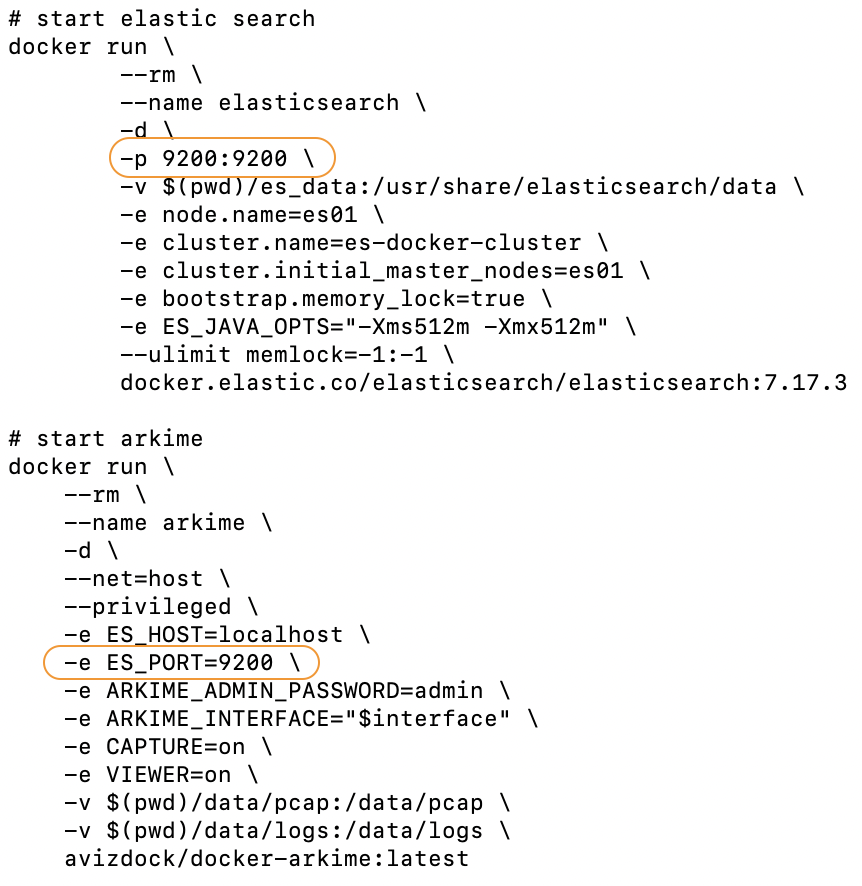
If port 9002 is used by another service running on the server, it can be changed in the ‘start.sh’ script before execution
Changing ES ports
**Port format:** *“Global port:Local port”*
Using your favourite text editor, change the ‘Global ports’ to any available and accessible port, also update the same port in the ‘ES\_PORT’ attribute.
##
## Changing Arkime Password
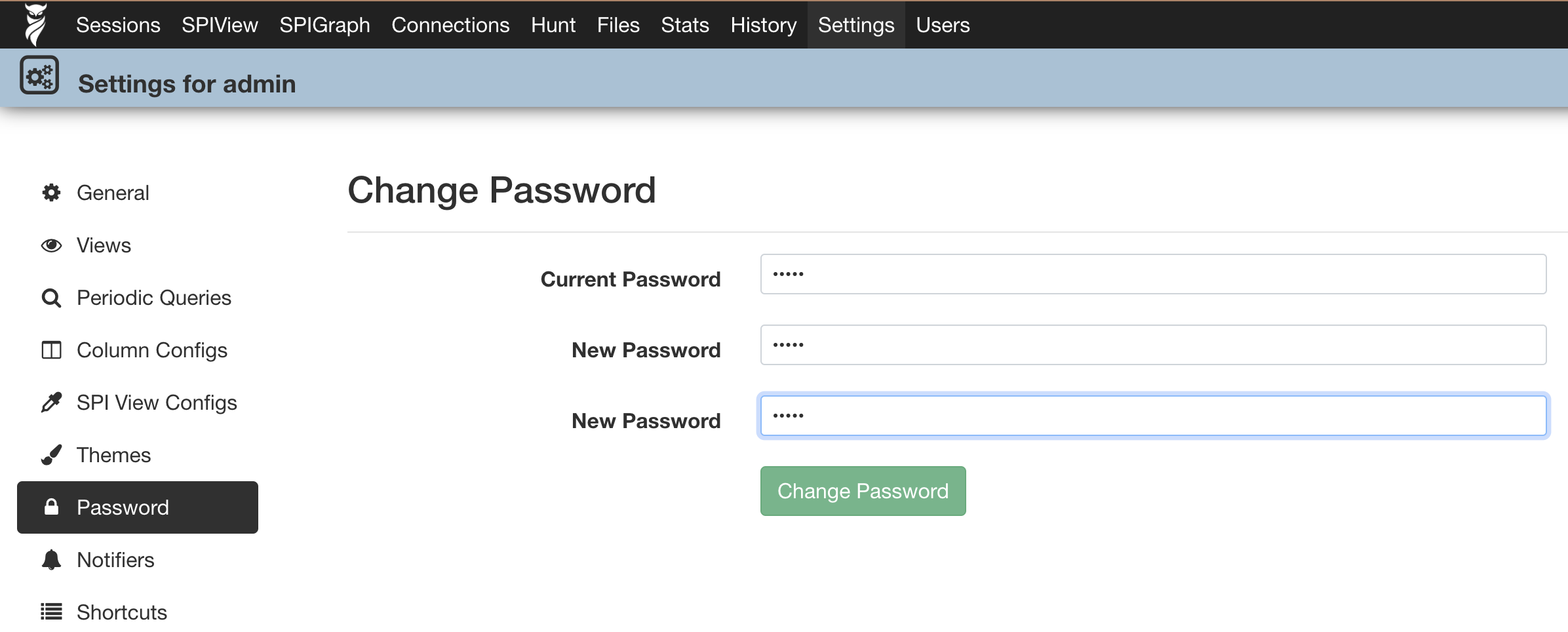
Log in to the Web GUI and navigate to User> admin\_user ⚙️>Password, enter ‘admin’ as the current password and set a new password for the admin user.
Changing password of Arkime GUI
## Changing Kibana Port
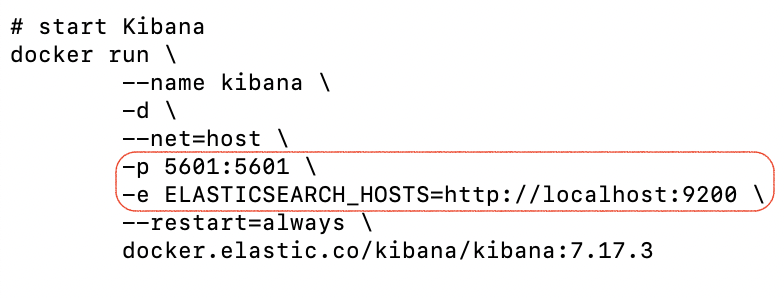
If port 5601 is used by another service running on the server, it can be changed in the ‘start.sh’ script before execution
also if the ES port was changed, the same can be edited here with the ES node IP.
Kibana Port
## Stopping Arkime & EC
Execute the ‘stop.sh’ script to stop & delete Arkime and EC docker containers, the script will not delete the data & es\_data folder and the stored PCAPs.
```bash
aviz@npbsrv01:~/OPB_Arkime/OPB_Analyzer$ sudo ./stop.sh
[sudo] password for aviz:
arkime
elasticsearch
aviz@npbsrv01:~/OPB_Arkime/OPB_Analyzer$
```
## Stopping Kibana
Execute the ‘stop.sh’ script to stop & delete Kibana docker containers
```bash
aviz@npbsrv01:~/OPB_Arkime/OPB_Kibana$ sudo ./stop.sh
[sudo] password for aviz:
Stopping Kibana...
kibana
kibana
aviz@npbsrv01:~/OPB_Arkime/OPB_Kibana$
```
#### External Links
* OPBNOS download link -
* OPBNOS configuration guide -
* Arkime installation script -
* Aviz support portal -
* Arkime official website -