# Test Bed Configuration

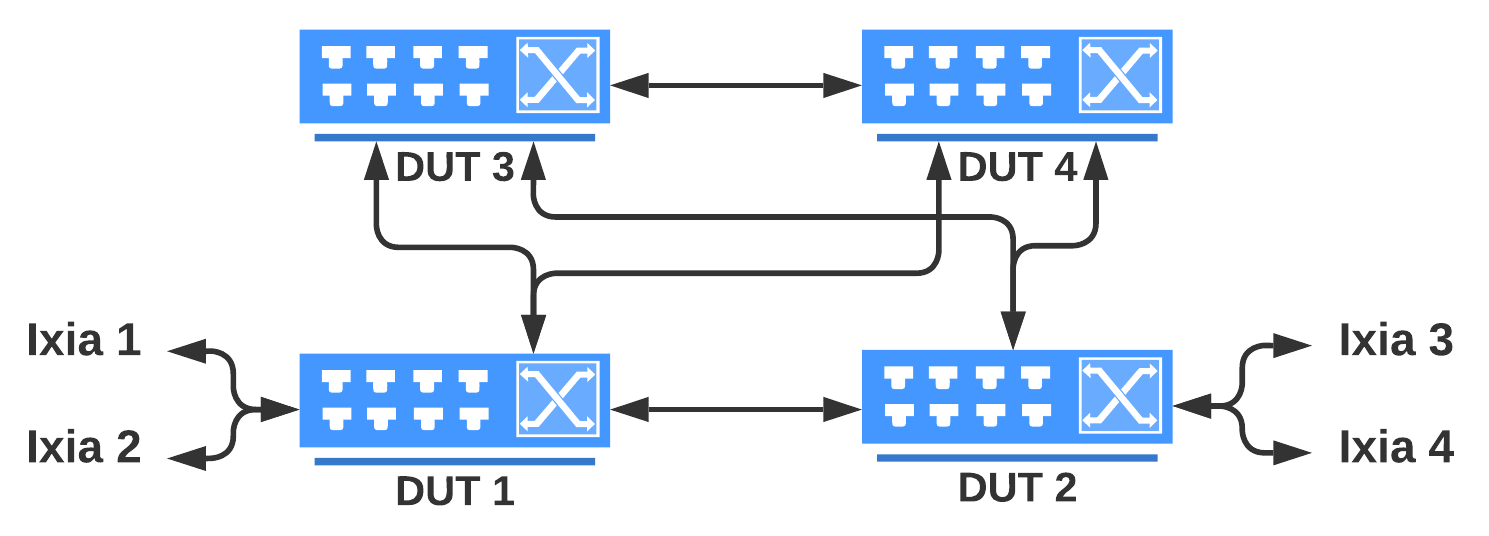
## Full Mesh 4 DUTs Topology

All test scripts except Chaos can be run with full mesh 4 DUTs topology

<figure><picture><source srcset="https://4242775588-files.gitbook.io/~/files/v0/b/gitbook-x-prod.appspot.com/o/spaces%2FED0MDIx0QbVQicwfMH38%2Fuploads%2FqxnJwAFruFjg7aD7F4b4%2Fftas4dut.png?alt=media&#x26;token=f2872dac-404d-4b89-a449-8dc6d84c8ece" media="(prefers-color-scheme: dark)"><img src="https://4242775588-files.gitbook.io/~/files/v0/b/gitbook-x-prod.appspot.com/o/spaces%2FED0MDIx0QbVQicwfMH38%2Fuploads%2FprM55ijCvhMH2BHkW1US%2Fftas4dut.png?alt=media&#x26;token=aec975f1-af5f-4b2b-b291-7d71811ac668" alt=""></picture><figcaption></figcaption></figure>

Use the following sample script and steps to create your own testbed file.

{% code lineNumbers="true" %}

```json
//Sample TestBed file
LEAF01_Ports = {"s2_p1": "Ethernet32", "s2_p1_speed": 100000,
                "s2_p2": "Ethernet36", "s2_p2_speed": 100000,
                "s1_p1": "Ethernet0", "s1_p1_speed": 100000,
                "s1_p2": "Ethernet4", "s1_p2_speed": 100000,
                "l2_p1": "Ethernet16", "l2_p1_speed": 100000,
                "l2_p2": "Ethernet20", "l2_p2_speed": 100000,
                "ixia_p1": "Ethernet60", "ixia_p1_speed": 100000,
                "ixia_p2": "Ethernet48", "ixia_p2_speed": 100000,
                "port_mtu": 9100
                }
LEAF01 = {"IP": "10.4.4.66", 
          "PROTO": "http", "REST_PORT": 6002, "SSH_PORT": 22,
          "CLI_PROMPTS": params.CLI_PROMPTS,
          "cliErrors": params.CLI_ERROR_REGEXP, "cliWarnings": params.CLI_WARN_REGEXP,
          "ssh_user": "admin",
          "ssh_passwd": "YourPaSsWoRd",
          "Timeout": 30, "ports": LEAF01_Ports, "name": "MLNX-LEAF01",
          "backup_cfg_file": "clean_config.json"
          }
```

{% endcode %}

* Update the above details in the testbed file with your DUTs - DUT connections, Management IP, Login credentials, Link Speed etc.
* The "name" parameter is very important. Provide a string to identify the respective for this parameter. This name is displayed in logs for easy identification of devices.
* Refer to the topology diagram to find the link variables and update their values
* All testbed files can be found in the folder "\~/testbeds/"

## Testbed file variables

There are two variables to control the cleanup after each test run in the testbed file.&#x20;

They are `CLEANUP_BY_REBOOT` *and* `CLEANUP_BY_CFG_RELOAD`:&#x20;

* CLEANUP\_BY\_REBOOT = Tru&#x65;*, The script will restore the switch's configuration from the <mark style="background-color:green;">/etc/sonic/clean\_config.json</mark> file and then reboot the switch.* This process consumes additional execution time, but it ensures that the DUTs (Devices Under Test) are consistently configured in a clean and proper manner for subsequent test scripts.
* CLEANUP\_BY\_CFG\_RELOAD = True, The script will restore the switch's configuration from the *<mark style="background-color:green;">/etc/sonic/clean\_config.json</mark> file and then issue the* `sudo config load` *command to load the clean config file. This method takes less time to have a clean configuration on switches but may not work correctly sometimes.*
* *If both* `CLEANUP_BY_REBOOT` *and* `CLEANUP_BY_CFG_RELOAD` are set to `False`, The scripts use the SONiC CLI procedure to un-configure whatever was configured on the switches by the scripts.
* CFG\_RELOAD\_BY\_REBOOT = False, The scripts will save the running configuration and reboot the device wherever config reload is required.
* Ideally, the below three parameters should be set to `False`
  * `CLEANUP_BY_REBOOT = False`
  * `CLEANUP_BY_CFG_RELOAD = False`
  * `CFG_RELOAD_BY_REBOOT = False`
* CLEANUP\_BEFORE\_TEST\_RUN = False. It can be used to do the forceful clean-up of all the devices before the test run

Apart from these, the following variables are specified in the testbed file:

* CFG\_RELOAD\_BY\_REBOOT = True, The scripts initiate device reboots in instances where the `config reload` command fails on the DUT due to certain reasons. This measure is taken as a workaround for such situations.
* REBOOT\_WAIT\_TIME = 0, Maximum wait time for the device to reboot
* NTP\_SERVER = \<FTAS VM IP>, FTAS VM serves as NTP server.
* SYSLOG\_SRVS = {"Servers": \["\<FTAS VM IP>", "10.4.5.6"], list of syslog servers to use. First list member should be set to the FTAS VM IP. The second IP can be a dummy IP.&#x20;
* Log\_Folder: "/var/log/sonic\_logs" : The log folder on FTAS VM to be used for syslog testing
* MAX\_V4\_ACL , Maximum IPv4 ACL rules supported on the platform
* MAX\_V6\_ACL , Maximum IPv6 ACL rules supported on the platform
* MAX\_SECONDARY\_SUBNET, Maximum secondary subnets supported for SVI interface
* MAX\_IPV4\_HOST\_ROUTES, Maximum IPv4 host routes supported on the platform
* MAX\_IPV6\_HOST\_ROUTES, Maximum IPv6 host routes supported on the platform
* MAX\_IPV4\_PREFIX\_ROUTES, Maximum IPv4 prefix routes supported on the platform
* MAX\_IPV6\_PREFIX\_ROUTES, Maximum IPv6 prefix routes supported on the platform
* TECHSUPPORT = True, Takes techsupport dump (If True) for the DUTs in case of failures
  * TECHSUPPORT\_SINCE  = "hour ago", Specifies the argument to the show techsupport command while collecting the techsupport dump in case of failures. This is valid only when `TECHSUPPORT = True` . Valid values are: `hour ago` (default), `yesterday` , or any other values supported by SONiC show techsupport --since option.&#x20;
  * TECHSUPPORT\_TIMEOUT, specifies the worst case timeout value for techsupport dump generation, in case `TECHSUPPORT = True`
* Stress testcases
  * STRESS\_AVAIL\_CORES = 2 , Number of CPU cores reserved for system use; rest other CPU cores will undergo stress testing. Example: if total cores are 16. Then STRESS\_AVAIL\_CORE=2 would mean that 14 cores will be stressed, and only two cores will be available for the test case.&#x20;
  * STRESS\_MEM\_UTIL = 85 , the percentage memory to be stressed during stress testing. In this case 85% of memory would be stressed, leaving only 15% memory available.&#x20;
  * SERVER\_IP = \<FTAS\_VM IP> ,  IP address of the server hosting the `stress-ng` docker image . The docker is part of FTAS VM.&#x20;
* SERVER\_USER\_ID = "oper" ,  User ID for SCP access to the server hosting the stress-ng Docker image&#x20;
* SERVER\_PASSWORD = "oper\@123" , Password for SCP access to securely transfer the stress-ng Docker image

### Parameters specific to resilience testcases

* TRAFFIC\_THRESHOLD =1, acceptable packet/frame loss percentage in traffic testcases
* CPU\_THRESHOLD = 5 , acceptable change in CPU utilization percentage
* MEM\_THRESHOLD = 5 , acceptable change in memory utilization percentage

### Variables with the default values

<table><thead><tr><th width="307">Variable with Default values</th><th>Description</th></tr></thead><tbody><tr><td>INTF_UP_WAIT_TIME = 30</td><td>Timeout for the interface to be 'Operationally UP'</td></tr><tr><td>CLI_TIMEOUT = 0</td><td>Assign an integer value to this variable if the command execution on the device experiences slowness or takes longer than 30 seconds to respond. <br>If the value is not explicitly set, the default will be 0, implying a 30-second wait time for the command execution output.</td></tr><tr><td>MAX_V4_ACL = 64</td><td>The maximum number of supported IPV4 ACL rules.<br>The variable used in the testcase <strong>test_v4_acl_scale_max_supported</strong> in test script <strong>scalability/taas_qual_scale.py</strong></td></tr><tr><td>MAX_V6_ACL = 64</td><td>The maximum number of supported IPV6 ACL rules.<br>The variable used in the testcase <strong>test_qual_v6_acl_scale_max_supported</strong> in test script <strong>scalability/taas_qual_scale.py</strong></td></tr><tr><td>MAX_SECONDARY_SUBNET = 25</td><td>The maximum number of supported secondary subnets under a vlan.<br>The variable used in the testcase <strong>test_max_secondary_subnet_under_vlan</strong> in test script <strong>scalability/taas_qual_scale.py</strong></td></tr><tr><td>MAX_IPV4_HOST_ROUTES = 1000</td><td>The maximum number of IPv4 host routes supported.<br>The variable used in the testcase <strong>test_v4_host_routes_scale_max_supported</strong> in test script <strong>scalability/taas_qual_scale.py</strong></td></tr><tr><td>MAX_IPV6_HOST_ROUTES = 1000</td><td>The maximum number of IPV6 host routes supported.<br>The variable used in the testcase <strong>test_v6_host_routes_scale_max_supported</strong> in test script <strong>scalability/taas_qual_scale.py</strong></td></tr><tr><td>MAX_IPV4_PREFIX_ROUTES = 1000</td><td>The maximum number of IPV4 prefix routes supported.<br>The variable used in the testcase <strong>test_v4_prefix_routes_scale_max_supported</strong> in test script <strong>scalability/taas_qual_scale.py</strong></td></tr><tr><td>MAX_IPV4_NEXTHOPS = 256</td><td>The maximum number of IPV4 next-hop supported.<br>The variable used in the testcase <strong>test_v4_nexthops_scale_max_supported</strong> in test script <strong>scalability/taas_qual_scale.py</strong></td></tr><tr><td>STRESS_AVAIL_CORES = 2  </td><td>Number of CPU cores reserved for system use. Rest other CPU cores will undergo stress testing</td></tr><tr><td>STRESS_MEM_UTIL = 85 </td><td>Targeted percentage of total system memory to allocate for stress testing </td></tr></tbody></table>

## **Configuring Ixia Variables**

### For UHD Chassis:&#x20;

<pre class="language-python"><code class="lang-python"><strong>IXIA_Ports = {"s1_p1": "&#x3C;port_no>", "s1_p2": "&#x3C;port_no>", "s1_p3": "&#x3C;port_no>", 
</strong>              "media": "fiber", "speed": "100G",
              "port_configs": {
              "&#x3C;localuhd>/&#x3C;8>": {"speed": "100G", "auto_negotiation": False, "rs_fec": True},

</code></pre>

* Specify the port connected to the DUT like this: `"s1_p1": "8"` , where the port number `8` is connected to `Spine01_Port01` for Ixia traffic.
* For example, Ixia port 8 can be configured like this: `"localuhd/8"`, where `localuhd` refers to the Ixia chassis and `8` is the UHD port number.

### For Novus Chassis:

```python
IXIA_Ports = {"s1_p1": "<card_no>;<Port_no>", "s1_p2": "<card_no>;<Port_no>", "s1_p3": "<card_no>;<Port_no>", 
              "media": "fiber", "speed": "100G",
              "port_configs": {
              "<chassis_ip>;<card_no>;<Port_no>": {"speed": "100G", "auto_negotiation": False, "rs_fec": True},
```

* Specify the port connected to the DUT like this: `"s1_p1": "1;8"` , where the port number `8` on Ixia card `1` is connected to `Spine01_Port01` for Ixia traffic.
* For example, Ixia port 1;8 can be configured like this: `"<chassis_ip>;<card_no>;<Port_no>"`, where `<chassis_ip>` refers to the Ixia chassis IP and `1;8` is the port with the card number.

{% hint style="info" %}
The FTAS VM has been extensively tested with UHD version 1.3.3003.118, It is recommended to use UHD with the same version for smooth operations.
{% endhint %}

{% hint style="warning" %}
Ixia port format varies and depends on the Ixia Chassis type
{% endhint %}

## Control Ixia traffic rate globally

For the testbeds where links between DUTs have less bandwidth than Ixia ports traffic tests may fail due to traffic drops on the least bandwidth links (i.e. DUTs may be connected with 1G ports and the Ixia link maybe 100G).&#x20;

To avoid this situation a global parameter for the ixia traffic rate `"global_traffic_rate"` in percentage could be used to enforce traffic rate in all tests.

When the `global_traffic_rate` parameter is defined as a sub-parameter in the `"Ixia_Ports"` all traffic streams in all test scripts would override their own rate value with `global_traffic_rate` value configured.

When `global_traffic_rate` is not defined all traffic streams in all test scripts would use their own static values for the traffic rate.

```python
# Ixia Parameters #
IXIA_Ports = {"s1_p1": "8", "s1_p2": "9", "s1_p3": "10", 
              "s2_p1": "11", "s2_p2": "12",
              "l1_p1": "8", "l1_p2": "9", "l1_p3": "10",
              "l2_p1": "11", "l2_p2": "12",
              "media": "fiber", "speed": "100G", "global_traffic_rate": 25,
              ...
```

Here the  `"global_traffic_rate": 25` referrers to 25% speed for all Ixia ports

CLI\_TIMEOUT, set the integer value for this variable when the command execution is slow or taking more than 30 sec to respond. Set the default value to 0 in the testbed file.

{% code title="full\_mesh\_topo.py" %}

```python
"""
    Description: Testbed information
"""
from genlibs import params
from genlibs import const

gParams = params.GLOBAL_PARAMS
pParams = params.PLATFORM_PARAMS
# PLS. DON'T CHANGE ANYTHING FROM HERE TO TOP OF THE FILE
# =================================================
ALL_DUTS = ["LEAF01", "LEAF02", "SPINE01", "SPINE02"]
# =================================================
CLEANUP_BY_REBOOT = False
CLEANUP_BY_CFG_RELOAD = False
CFG_RELOAD_BY_REBOOT = False
CHECK_COMPATIBILITY = False
CLEANUP_BEFORE_TEST_RUN = False

NET_SERVICES_CONTAINER_NAME = "net_services"
NTP_SERVER = "10.4.5.245"
INTF_UP_WAIT_TIME = 30
REBOOT_WAIT_TIME = 300
CLI_TIMEOUT = 0
MAX_V4_ACL = 64
MAX_INGRESS_V4_ACL = 64
MAX_V6_ACL = 64
MAX_SECONDARY_SUBNET = 25
MAX_IPV4_HOST_ROUTES = 1000
MAX_IPV6_HOST_ROUTES = 1000
MAX_IPV4_PREFIX_ROUTES = 1000
MAX_IPV6_PREFIX_ROUTES = 32000
MAX_IPV4_ROUTES_PER_NEXTHOP = 256
MAX_IPV4_NEXTHOPS = 2048
TECHSUPPORT = True
TECHSUPPORT_SINCE = "hour ago"
TECHSUPPORT_TIMEOUT = 300
STRESS_AVAIL_CORES = 2  # Number of CPU cores reserved for system use; all other cores will undergo stress testing
STRESS_MEM_UTIL = 85    # Targeted percentage of total system memory to allocate for stress testing
SERVER_IP = "10.20.0.75" # IP address of the server hosting the stress-ng Docker image
SERVER_USER_ID = "oper"  # User ID for SCP access to the server hosting the stress-ng Docker image
SERVER_PASSWORD = "oper@123" # Password for SCP access to securely transfer the stress-ng Docker image

SYSLOG_SRVS = {"Servers": ["10.4.5.245", "10.4.5.6"], "Log_Folder": "/var/log/sonic_logs"}
TACACS_SRVS = [{"address": "10.4.5.177", "secret_key": "T@c@csSonic123"},
               {"address": "10.4.5.179", "secret_key": "T@c@csSonic123"}]
TACACS_USERS = {"admin_user": "tacadmin", "admin_passwd": "sadmin@123", "oper_user": "tacuser",
                "oper_passwd": "suser@123"}

IXIA_Ports = {"l1_p1": "21", "l1_p2": "24",
              "l2_p1": "22", "l2_p2": "23",
              "global_traffic_rate": 80,
              "media": "fiber", "speed": "100G",
              "port_configs": {
                  "localuhd/21": {"speed": "100G", "auto_negotiation": False, "rs_fec": True},
                  "localuhd/22": {"speed": "100G", "auto_negotiation": False, "rs_fec": True},
                  "localuhd/23": {"speed": "100G", "auto_negotiation": False, "rs_fec": True},
                  "localuhd/24": {"speed": "100G", "auto_negotiation": False, "rs_fec": True}
                  }
              }

IXIA = {"IP": "10.4.4.10", "username": "aviz", "password": "aviz@123", "ports": IXIA_Ports}

LOGSRV1 = {"IP": "10.1.1.11", "SSH_PORT": 22, "ssh_user": "aviz", "ssh_passwd": "IxiaAviz2020", "Timeout": 30,
           "name": "Syslog1", "CLI_PROMPTS": params.LINUX_PROMPTS}

# Linux Server to host services likes: NTP, Syslog, Tac_plus, etc. avtest user is in sudo group and no password
TESTSRV1 = {"IP": "10.109.9.112", "SSH_PORT": 22, "ssh_user": "avtest", "ssh_passwd": "avtest@123", "Timeout": 30,
            "name": "TestSrv1", "CLI_PROMPTS": params.LINUX_PROMPTS}

SPINE01_Ports = {"l1_p1": "Ethernet0", "l1_p1_speed": 100000,
                 "l1_p2": "Ethernet4", "l1_p2_speed": 100000,
                 "l2_p1": "Ethernet24", "l2_p1_speed": 100000,
                 "l2_p2": "Ethernet28", "l2_p2_speed": 100000,
                 "s2_p1": "Ethernet32", "s2_p1_speed": 100000,
                 "s2_p2": "Ethernet36", "s2_p2_speed": 100000,
                 "port_mtu": 9100
                 }
SPINE01 = {"IP": "10.4.4.65",
           "PROTO": "http", "REST_PORT": 9001, "SSH_PORT": 22,
           "CLI_PROMPTS": params.CLI_PROMPTS,
           "cliErrors": params.CLI_ERROR_REGEXP, "cliWarnings": params.CLI_WARN_REGEXP,
           "ssh_user": "admin",
           "ssh_passwd": "YourPaSsWoRd",
           "Timeout": 30, "ports": SPINE01_Ports, "name": "MLNX-SPINE01",
           "backup_cfg_file": "clean_config.json"
           }

SPINE02_Ports = {"l1_p1": "Ethernet16", "l1_p1_speed": 100000,
                 "l1_p2": "Ethernet20", "l1_p2_speed": 100000,
                 "l2_p1": "Ethernet0", "l2_p1_speed": 100000,
                 "l2_p2": "Ethernet4", "l2_p2_speed": 100000,
                 "s1_p1": "Ethernet32", "s1_p1_speed": 100000,
                 "s1_p2": "Ethernet36", "s1_p2_speed": 100000,
                 "port_mtu": 9100
                 }
SPINE02 = {"IP": "10.4.4.67",
           "PROTO": "http", "REST_PORT": 6018, "SSH_PORT": 22,
           "CLI_PROMPTS": params.CLI_PROMPTS,
           "cliErrors": params.CLI_ERROR_REGEXP, "cliWarnings": params.CLI_WARN_REGEXP,
           "ssh_user": "admin",
           "ssh_passwd": "YourPaSsWoRd",
           "Timeout": 30, "ports": SPINE02_Ports, "name": "MLNX-SPINE02",
           "backup_cfg_file": "clean_config.json"
           }

LEAF01_Ports = {"s2_p1": "Ethernet16", "s2_p1_speed": 100000,
                "s2_p2": "Ethernet20", "s2_p2_speed": 100000,
                "s1_p1": "Ethernet0", "s1_p1_speed": 100000,
                "s1_p2": "Ethernet4", "s1_p2_speed": 100000,
                "l2_p1": "Ethernet32", "l2_p1_speed": 100000,
                "l2_p2": "Ethernet36", "l2_p2_speed": 100000,
                # provide the breakout modes for the supp ports in the below format
                # "l2_p1": "Ethernet72", "l1_p3_speed": 100000,
                # "l2_p1_breakout": "1x100G[40G], 2x50G, 4x25G, 4x10G",
                "ixia_p1": "Ethernet60", "ixia_p1_speed": 100000,
                "ixia_p2": "Ethernet48", "ixia_p2_speed": 100000,
                "port_mtu": 9100
                }
LEAF01 = {"IP": "10.4.4.66",
          "PROTO": "http", "REST_PORT": 6002, "SSH_PORT": 22,
          "CLI_PROMPTS": params.CLI_PROMPTS,
          "cliErrors": params.CLI_ERROR_REGEXP, "cliWarnings": params.CLI_WARN_REGEXP,
          "ssh_user": "admin",
          "ssh_passwd": "YourPaSsWoRd",
          "Timeout": 30, "ports": LEAF01_Ports, "name": "MLNX-LEAF01",
          "backup_cfg_file": "clean_config.json"
          }

LEAF02_Ports = {"s2_p1": "Ethernet0", "s2_p1_speed": 100000,
                "s2_p2": "Ethernet4", "s2_p2_speed": 100000,
                "s1_p1": "Ethernet24", "s1_p1_speed": 100000,
                "s1_p2": "Ethernet28", "s1_p2_speed": 100000,
                "l1_p1": "Ethernet32", "l1_p1_speed": 100000,
                "l1_p2": "Ethernet36", "l1_p2_speed": 100000,
                # provide the breakout modes for the supp ports in the below format
                # "l1_p3": "Ethernet72", "l1_p3_speed": 100000,
                # "l1_p3_breakout": "1x100G[40G], 2x50G, 4x25G, 4x10G",
                "ixia_p1": "Ethernet60", "ixia_p1_speed": 100000,
                "ixia_p2": "Ethernet48", "ixia_p2_speed": 100000,
                "port_mtu": 9100
                }
LEAF02 = {"IP": "10.4.4.68",
          "PROTO": "http", "REST_PORT": 6002, "SSH_PORT": 22,
          "CLI_PROMPTS": params.CLI_PROMPTS,
          "cliErrors": params.CLI_ERROR_REGEXP, "cliWarnings": params.CLI_WARN_REGEXP,
          "ssh_user": "admin",
          "ssh_passwd": "YourPaSsWoRd",
          "Timeout": 30, "ports": LEAF02_Ports, "name": "MLNX-LEAF02",
          "backup_cfg_file": "clean_config.json"
          }
```

{% endcode %}

## 2 DUTs Topology

If you don't have 4 DUTs topology and want to run scripts that require only 2 DUTs, You can use `2dut_topo.py` testbed parameter file

<figure><img src="https://content.gitbook.com/content/ED0MDIx0QbVQicwfMH38/blobs/YtBtqpkhjdebHxcBpvUt/2%20DUT%20Main.png" alt=""><figcaption><p>Figure 8: Links variables for full mesh 4 DUTs</p></figcaption></figure>

There are two physical DUTs in the topology but the script might pick the name Spine and Leaf interchangeably. So in the testbed file, we should define parameters for both but they point to the same physical Spine and Leaf DUTs.

{% code title="2dut\_topo.py" %}

```python
"""
    Description: Testbed information
"""
from genlibs import params
from genlibs import const

gParams = params.GLOBAL_PARAMS
pParams = params.PLATFORM_PARAMS

# =================================================
ALL_DUTS = ['SPINE01', 'SPINE02']
# =================================================
CLEANUP_BY_REBOOT = False
CLEANUP_BY_CFG_RELOAD = False 
CFG_RELOAD_BY_REBOOT = False
CHECK_COMPATIBILITY = False
CLEANUP_BEFORE_TEST_RUN = False

NTP_SERVER = "10.4.5.4"

INTF_UP_WAIT_TIME = 30
REBOOT_WAIT_TIME = 120
CLI_TIMEOUT = 0

MAX_V4_ACL = 64
MAX_V6_ACL = 64
MAX_SECONDARY_SUBNET = 25
MAX_IPV4_HOST_ROUTES = 1000
MAX_IPV6_HOST_ROUTES = 1000
MAX_IPV4_PREFIX_ROUTES = 1000
MAX_IPV4_NEXTHOPS = 256

ZTP_PARAMS = {"ZTP_HTTP_SRV_ADDR": "10.4.5.177", "ZTP_HTTP_SRV_PORT": "8090", "ZTP_FOLDER": "/home/oper/reports/ztp",
              "DHCP_CONTAINER": "ztp_dhcp"}

NET_SERVICES_CONTAINER_NAME = "net_services"

SYSLOG_SRVS = {"Servers": ["<SYSLOG server IP1>", "<SYSLOG server IP2>"], 'Log_Folder': "/var/log/sonic_logs"}
TACACS_SRVS = [{"address": "<IP address1>", "secret_key": "T@c@csSonic123"},
               {"address": "<IP address2>", "secret_key": "T@c@csSonic123"}]
TACACS_USERS = {"admin_user": "tacadmin", "admin_passwd": "sadmin@123",
                "oper_user": "tacuser", "oper_passwd": "suser@123"}

# Ixia Parameters #
IXIA_Ports = {"s1_p1": "8", "s1_p2": "9", "s1_p3": "10",
              "s2_p1": "11", "s2_p2": "12",
              "l1_p1": "8", "l1_p2": "9", "l1_p3": "10",
              "l2_p1": "11", "l2_p2": "12",
              "media": "fiber", "speed": "100G",
              "port_configs": {
                  "localuhd/8": {"speed": "100G", "auto_negotiation": False, "rs_fec": True},
                  "localuhd/9": {"speed": "100G", "auto_negotiation": False, "rs_fec": True},
                  "localuhd/10": {"speed": "100G", "auto_negotiation": False, "rs_fec": True},
                  "localuhd/11": {"speed": "100G", "auto_negotiation": False, "rs_fec": True},
                  "localuhd/12": {"speed": "100G", "auto_negotiation": False, "rs_fec": True},
              }}

IXIA = {"IP": "<Ixia IP>", "username": "<ix username>", "password": "<Ixia passwd>", "ports": IXIA_Ports}

# DUTs Parameters #
SPINE01_Ports = {"s2_p1": "Ethernet0", "s2_p1_speed": 100000,
                 "s2_p2": "Ethernet8", "s2_p2_speed": 100000,
                 "ixia_p1": "Ethernet232",
                 "ixia_p2": "Ethernet240",
                 "ixia_p3": "Ethernet248"}

SPINE01 = {"IP": "<SPINE1 IP>", 'SSH_PORT': 22, "CLI_PROMPTS": params.CLI_PROMPTS,
           "cliErrors": params.CLI_ERROR_REGEXP,
           "cliWarnings": params.CLI_WARN_REGEXP,
           "climode": const.CliModes.SONiC_CLI, "ports": SPINE01_Ports,
           "ssh_user": "admin", "ssh_passwd": "Innovium123",
           "Timeout": 30, "name": "Spine1",
           "backup_cfg_file": "clean_config.json"}

SPINE02_Ports = {"s1_p1": "Ethernet0", "s1_p1_speed": 100000,
                 "s1_p2": "Ethernet8", "s1_p2_speed": 100000,
                 "ixia_p1": "Ethernet240",
                 "ixia_p2": "Ethernet248"}
SPINE02 = {"IP": "<SPINE2 IP>", 'SSH_PORT': 22, "CLI_PROMPTS": params.CLI_PROMPTS,
           "cliErrors": params.CLI_ERROR_REGEXP,
           "cliWarnings": params.CLI_WARN_REGEXP,
           "climode": const.CliModes.SONiC_CLI, "ports": SPINE02_Ports,
           "ssh_user": "admin", "ssh_passwd": "Innovium123",
           "Timeout": 30, "name": "Spine2",
           "backup_cfg_file": "clean_config.json"}

LEAF01_Ports = {"l2_p1": "Ethernet32", "l2_p1_speed": 100000,
                "l2_p2": "Ethernet40", "l2_p2_speed": 100000,
                "ixia_p1": "Ethernet240",
                "ixia_p2": "Ethernet248"}

LEAF01 = {"IP": "<SPINE1 IP>", 'SSH_PORT': 22, "CLI_PROMPTS": params.CLI_PROMPTS,
          "cliErrors": params.CLI_ERROR_REGEXP,
          "cliWarnings": params.CLI_WARN_REGEXP,
          "climode": const.CliModes.SONiC_CLI, "ports": LEAF01_Ports,
          "ssh_user": "admin", "ssh_passwd": "Innovium123",
          "Timeout": 30, "name": "Leaf1",
          "backup_cfg_file": "clean_config.json"}

LEAF02_Ports = {"l1_p1": "Ethernet32", "l1_p1_speed": 100000,
                "l1_p2": "Ethernet40", "l1_p2_speed": 100000,
                "ixia_p1": "Ethernet240",
                "ixia_p2": "Ethernet248"}

LEAF02 = {"IP": "<SPINE2 IP>", 'SSH_PORT': 22,
          "CLI_PROMPTS": params.CLI_PROMPTS,
          "cliErrors": params.CLI_ERROR_REGEXP,
          "cliWarnings": params.CLI_WARN_REGEXP,
          "climode": const.CliModes.SONiC_CLI, "ports": LEAF02_Ports,
          "ssh_user": "admin", "ssh_passwd": "Innovium123",
          "Timeout": 30, "name": "Leaf2",
          "backup_cfg_file": "clean_config.json"}
```

{% endcode %}

## Full Mesh 4 DUTs Topology for Chaos

`ftas_chaos_topo.py` (sample topology file) the testbed parameter file is used for Chaos test scripts only.

A new parameter `PCH_CONFIGURATION = False,` has been added. This parameter determines if the tests are to be run on routed port (if False) or routed PortChannel (if True) configuration for the interfaces connecting DUTs.&#x20;

<figure><img src="https://content.gitbook.com/content/ED0MDIx0QbVQicwfMH38/blobs/UL5mHVkk48YX5r2dmSEa/4%20DUT%202+2.png" alt=""><figcaption><p>Figure 9: Link variables for Chaos testbed</p></figcaption></figure>

{% code title="ftas\_chaos\_topo.py" %}

```python
"""
    Description: Testbed information
"""
from genlibs import params
from genlibs import const

gParams = params.GLOBAL_PARAMS
pParams = params.PLATFORM_PARAMS

# =================================================
ALL_DUTS = ['LEAF01', 'LEAF02', 'SPINE01', 'SPINE02']
# =================================================
result_dir = "/home/oper/reports"

CLEANUP_BY_REBOOT = False
CLEANUP_BY_CFG_RELOAD = False

West_Ixia_Params = {"ports": [21], "ixmedia": "fiber", "ixspeed": "100G", "peer": "leaf1"}

East_Ixia_Params = {"ports": [22], "ixmedia": "fiber", "ixspeed": "100G", "peer": "leaf2"}
IXIA = {"IP": "10.4.4.10", "username": "aviz", "password": "aviz@123", "ixmedia": "fiber", "ixspeed": "100G"}
INTF_UP_WAIT_TIME = 30
REBOOT_WAIT_TIME = 300
CLI_TIMEOUT = 0
PCH_CONFIGURATION = False  # to disable the PCH configuration in chaos scripts, default is True
TECHSUPPORT = True
TECHSUPPORT_SINCE = "hour ago"
TECHSUPPORT_TIMEOUT = 120
ACCEPTABLE_DELTA = 0.5 #Threshold for acceptable packet/frame loss percentage
CPU_MEM_THRESHOLD = 5 ## Threshold for acceptable change in CPU/memory utilization percentage

# Use a network with prefixlen = 24
MASTER_NETWORK = "172.16.1.0/24"

S1_Ports = [
    # Links from Spine1 to Leaf1
    {"s1": "Ethernet0", "l1": "Ethernet0", "speed": 100000,
     "netinfo": {"spine_ip": "", "leaf_ip": ""}, "peer": "leaf1"},
#    {"s1": "Ethernet4", "l1": "Ethernet4", "speed": 100000,
#     "netinfo": {"spine_ip": "", "leaf_ip": ""}, "peer": "leaf1"},
    # Links from Spine1 to Leaf2
    {"s1": "Ethernet24", "l2": "Ethernet24", "speed": 100000,
     "netinfo": {"spine_ip": "", "leaf_ip": ""}, "peer": "leaf2"}]
#    {"s1": "Ethernet28", "l2": "Ethernet28", "speed": 100000,
#     "netinfo": {"spine_ip": "", "leaf_ip": ""}, "peer": "leaf2"}]

S2_Ports = [
    # Links from Spine2 to Leaf1
    {"s2": "Ethernet16", "l1": "Ethernet16", "speed": 100000,
     "netinfo": {"spine_ip": "", "leaf_ip": ""}, "peer": "leaf1"},
#    {"s2": "Ethernet20", "l1": "Ethernet20", "speed": 100000,
#     "netinfo": {"spine_ip": "", "leaf_ip": ""}, "peer": "leaf1"},
    # Links from Spine2 to Leaf2
    {"s2": "Ethernet0", "l2": "Ethernet0", "speed": 100000,
     "netinfo": {"spine_ip": "", "leaf_ip": ""}, "peer": "leaf2"}]
#    {"s2": "Ethernet4", "l2": "Ethernet4", "speed": 100000,
#     "netinfo": {"spine_ip": "", "leaf_ip": ""}, "peer": "leaf2"}]

L1_Ixia_Ports = [
    # Links from Leaf1 to Ixia
    {"ixia": "21", "l1_ixia": "Ethernet60", "speed": 100000,
     "netinfo": {"ixia_ip": "", "leaf_ip": ""},
     "port_configs": {"localuhd/21": {"speed": "100G", "auto_negotiation": False, "rs_fec": True}}}]

L2_Ixia_Ports = [
    # Links from Leaf1 to Ixia
    {"ixia": "22", "l2_ixia": "Ethernet60", "speed": 100000,
     "netinfo": {"ixia_ip": "", "leaf_ip": ""},
     "port_configs": {"localuhd/22": {"speed": "100G", "auto_negotiation": False, "rs_fec": True}}}]
#    {"ixia": "10", "l2_ixia": "Ethernet100", "speed": 1000000,
#     "netinfo": {"ixia_ip": "", "leaf_ip": ""}}]

SPINE01 = {"IP": "10.4.4.65", 'SSH_PORT': 22,
           "CLI_PROMPTS": params.CLI_PROMPTS,
           "cliErrors": params.CLI_ERROR_REGEXP,
           "cliWarnings": params.CLI_WARN_REGEXP,
           "climode": const.CliModes.SONiC_CLI,
           "ssh_user": "admin", "ssh_passwd": "YourPaSsWoRd",
           "Timeout": 30, "ports": S1_Ports, "name": "Spine1",
           "backup_cfg_file": "clean_config.json"}

SPINE02 = {"IP": "10.4.4.67", 'SSH_PORT': 22,
           "CLI_PROMPTS": params.CLI_PROMPTS,
           "cliErrors": params.CLI_ERROR_REGEXP,
           "cliWarnings": params.CLI_WARN_REGEXP,
           "climode": const.CliModes.SONiC_CLI,
           "ssh_user": "admin", "ssh_passwd": "YourPaSsWoRd",
           "Timeout": 30, "ports": S1_Ports, "name": "Spine2",
           "backup_cfg_file": "clean_config.json"}

LEAF01 = {"IP": "10.4.4.66", 'SSH_PORT': 22,
          "CLI_PROMPTS": params.CLI_PROMPTS,
          "cliErrors": params.CLI_ERROR_REGEXP,
          "cliWarnings": params.CLI_WARN_REGEXP,
          "climode": const.CliModes.SONiC_CLI,
          "ssh_user": "admin", "ssh_passwd": "YourPaSsWoRd",
          "Timeout": 30, "ports": S1_Ports + S2_Ports, "name": "Leaf1",
          "backup_cfg_file": "clean_config.json"}

LEAF02 = {"IP": "10.4.4.68", 'SSH_PORT': 22,
          "CLI_PROMPTS": params.CLI_PROMPTS,
          "cliErrors": params.CLI_ERROR_REGEXP,
          "cliWarnings": params.CLI_WARN_REGEXP,
          "climode": const.CliModes.SONiC_CLI,
          "ssh_user": "admin", "ssh_passwd": "YourPaSsWoRd",
          "Timeout": 30, "ports": S1_Ports + S2_Ports, "name": "Leaf2",
          "backup_cfg_file": "clean_config.json"}

```

{% endcode %}